
Douala · Yaoundé · all over Cameroon
Your location map, ready in one minute
Share your position: PlanLoc finds the nearest well-known junction, draws the way, places the landmarks and writes the directions. All that's left is to print.
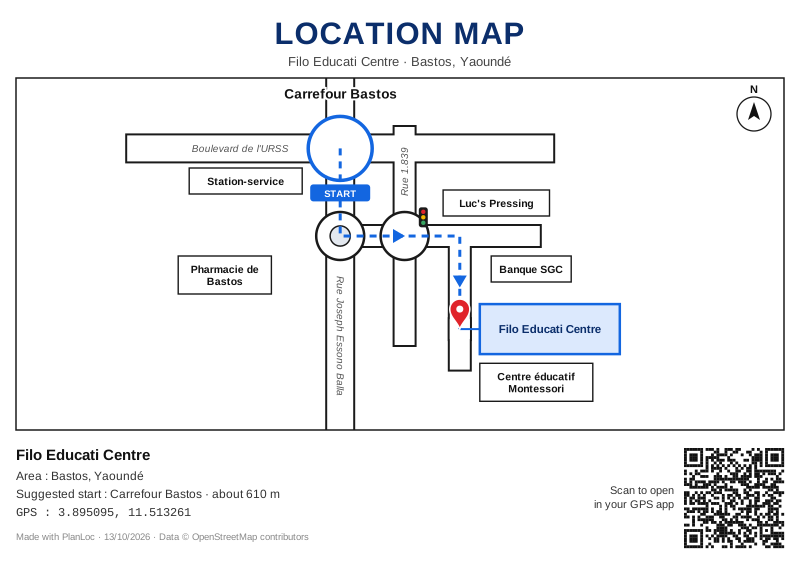
Accepted wherever a location map is required
- Opening a bank account
- Rental contracts
- Administrative files
- School enrolment
- Deliveries and visitors
- Businesses and shops
How it works
- 1
Set your position
With your phone's GPS, or by tapping the map in front of your door.
- 2
Adjust the map
Pick the starting junction, keep the useful landmarks, add your own.
- 3
Pay and download
Orange Money or MTN MoMo, then PDF, Word or image, in A5, A4 or A3.
A real map, not a screenshot
Landmarks everyone knows
Pharmacies, schools, churches, petrol stations… and the ones you add yourself.
Written directions
“After 160 m, turn left at the pharmacy.” Printed on the map.
GPS QR code
Couriers and visitors scan it and arrive right at your door.
Every format
PDF, Word, PNG, JPG or SVG, in A5, A4, A3 or Letter, portrait or landscape.
One price, no subscription
100 FCFA
per map
- Free, unlimited preview
- Free changes for 48 hours
- All file formats included
- Pay with Orange Money or MTN MoMo
Frequently asked questions
Do I need an account?
No. After paying, keep the link to your map: it lets you find it and download it again.
My area has no street names. Will it work?
Yes. PlanLoc relies on junctions and well-known landmarks, like a hand-drawn map. You can add your own landmarks.
How do I pay?
With Orange Money or MTN Mobile Money. You confirm the payment on your phone with your PIN.
Can I edit my map after paying?
Yes, for 48 hours: texts, landmarks, format. The location itself can no longer change.
Where do the maps come from?
From OpenStreetMap, the free collaborative map, plus landmarks added by PlanLoc users.
Your location map, ready in one minute
Create my map now